SEO Power – Must-Have Free WordPress Plugin!
A couple of days ago I received an email in my inbox promoting the new free WordPress plugin SEO Power; it is supposed to improve your site’s Google ranking and bring in more traffic.
Naturally curious, I had to check out the site, of course! And I am a bit of a sucker for plugins, especially free ones… 😉
After downloading and activating the plugin (you will get video instructions on how to do this, if you should not know), I have to say that I am really impressed with the features! I think Mark Dulisse has done a great job with this plugin. It will make your SEO so much easier. I especially like the list of suggested plugins (for SEO purposes) you get within your wp-admin after installing the plugin 😉 (told you, – I’m a plugin-sucker!). I was very surprised that out of a list of 13 suggested plugins for SEO improvement I had only 2 installed!!!
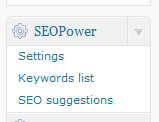
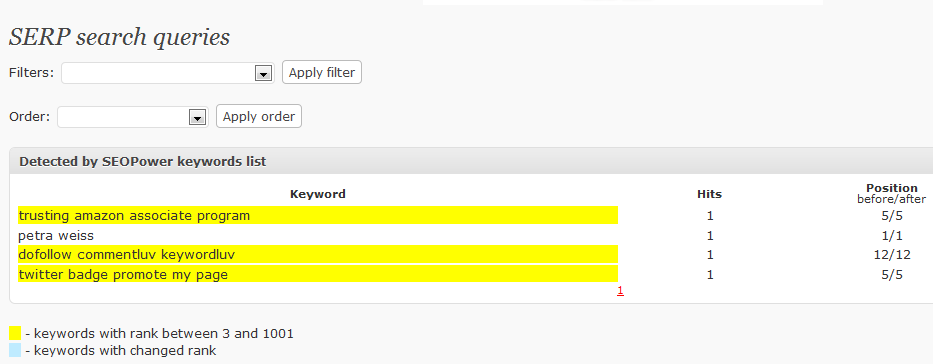
I am not going into what this plugin will do for you – you can read all about it on the SEO Power website -, but I will attach a few screenshots from within my blog so you can see what it will look like.
My suggestion is for you to get the plugin – you will not regret it. I can’t tell you any results yet – I had it only installed for a day so far, I need to give it a little bit of time – but I have no doubt that it will work.
This is just a little gem I couldn’t let pass you by! BTW – if you click on the screenshots, you will be able to have a better look at them.


Hi Petra,
Thanks for the info, I will test drive on a new site I have. I will come back and tell you how it went! SY
hospitalera recently posted…Make Money with the Market Samurai Affiliate Program
It seems an interesting plugin
how does it compare to all in one seo?
I think both plugins are great for overall SEO purposes. Either one will do the trick – I have them installed together at the moment but I am not so sure whether that’s such a great idea. I think just working with one will be best, doesn’t really matter which one.
Petra – Awesome! I will have to check it out now. I’ll add it to the list of SEO techniques (I suppose this will be a tool) that I am going to check out. Thanks!
Tia
Tia recently posted…SEO Techniques Reviewed: StaminaPilates.org, Day 4
Hey Petra,
I’m like you in that I like to use plugins and when I see a new one, I just have to check it out…I’ll be checking this out too.
I have several blog sites and I try to experiment with plugins to see how effective they are. Usually I have no problems with them but occasionally, I find that some plugins are not compatible with other ones.
I think I have about a dozen working on my sites now and all seem to be working like they should.
Thanks for the info on this one.
Later,
Mike
Mike Helton recently posted…Why Some Marketers Fail at List Marketing…Part 2
This SEO POWER WordPress plugin contains a unique “SEO Suggestions” section where Mark will list All of the Optimization and Automation plugins that I use on Every single internet site I create! Nearly like I’m proper there over your shoulder!
I’d like to get my new little blog Daily Vitamin Sea off the ground…, it’s been going for about 2 months, but visitor wise it’s in the same range as it was a month before. Do I have to wait 6 months to see improvement (sandbox issue)? I do have an SEO plugin installed…, have to check out this one. I’m curious how it’s going to work for you!!
Maya recently posted…The South Coast of England
This plugin is very popular among bloggers using WordPress. This can help gain PR by manipulating the keywords for every post. It’s good you have it on your blog.
A good SEO technique is a skill set you develop for occasional use. A bad SEO technique is something you feel like you have to do every time you create a page. For example, last week I suggested people stop using keywords in their title tags. Most of the comments I saw around the Web concerning that tip were tentatively accepting. A few people claimed it was just bad advice.
Sorry to say, but I think it IS bad advice. You should use your keywords in your title tags.
Got to be a must to use keywords in your title tag.
Quick way to check… google your keywords and see who comes top, then check their titles.
Always a good idea to learn from the top ranked sites.
Keith Davis recently posted…A splash of colour
Even a kid can get started blogging on WordPress.com, its that easy. If blogging is your only passion, and you have no idea about what HTML, CSS, PHP, FTP, MySQL is, and you do not want to waste your time backing up, upgrading and worrying about blog security – get a WordPress.com blog today.
I use wordpress. Because WordPress is such a popular blogging platform, it’s easy to find developers to work on it. It also certainly doesn’t hurt that WordPress is written in PHP — the most popular programming language on the planet!
Thanks I’ll give that a go. Ive been off the blogging lately, need to get back into it
Hows your IM stuff going?
Peter Davies recently posted…Reasons Why Email Marketing is Better Than Print Advertising
Please Do post your results with the plug in either as a comment in this blog or in a separate post. so that ppl can understand the worthiness of this plugin. Thanx for the info .
You won’t ever need to go searching for any other tools — right now you can get your hands on the most complete set of effective SEO software that is absolutely enough to achieve and maintain top traffic–generating positions in any search engine.
Yep because lot of SEO softwares are avaliable to download and this will make the person work more easier i think this software may work in future.
Hi Petra
I use the SEO plugin that I’m guessing most people use… All in one SEO.
This one sounds good and I will go over to the plugin site and take a look.
I’d advise anyone interested in SEO to do a lot of reading on SEO generally and then see how the plugins apply the basic principles to a WordPress site.
One of the big problems with wordpress is “duplicate content”, which generally dosen’t apply to a basic html site.
Thanks for the heads up Petra
Keith Davis recently posted…A splash of colour
I would love to here about your results with this plugin Petra. Did you use any other SEO plugin prior to installing “SEO Power” in order to compare results?
At present I use the All In One Seo Plugin.
Joe, I did not use anything else before. Just a few plugins “all over the place”, but nothing on SEO.
Hi Petra,
I was going to ask you the same question because I’d be very interested how this plug in compares with All in One SEO.
Now that I know you haven’t used it I’ll be waiting to see what results this new plug brings you.
I must say that I try to use the most important plug ins only and feel no temptation to try them all.
Thanks for sharing.
Vance
Vance recently posted…Learn How To Build Your Email List Using Online Giveaways
Vance, good on you to be able to resist temptation! I should try that occasionally…;)
Thanks Petra,
Your article post is really very nice. I’m a Seo analyst and fully satisfied with your tips for Seo you mentioned above. I will do same as you said to do and i hope it will make my Seo task easy. Thanks for all once again. Keep updating like that.
I have been only using allinoneseo plugin in my wordpress blog but never heard about any other good SEO plugin.
But as you said and posted about this plugin so i would love to use it! Let me see what changes and benefits i can get from it!
Also i would love to know that can i use both the plugins , allinoneseo and SEOpower, or i need to disable one of them always?
Anyhow, i have bookmarked you and even love to follow comments on this..
Nick, I would say you should disable AllInOneSEO, but that’s just my opinion.
Being a newbie in the field of making money online, I am much eager to get this type of postings. I am looking for resources to promote my blogs in wordpress as wellas in blogger. I appreciate your endeavor to enrich thousands of bloggers like me.
josechukkiri recently posted…It is not right
i have heard about this. I need to look into it. I am new to your blog and have found it very interesting. I am looking forward to seeing more from you!
NEAT! Thanks for the tip! All i’m using right now is All in One SEO and it’s a little overwhelming to keep track of everything. I’ll give this a try. 🙂 Thanks, really!
Anna recently posted…Herpes Natural Cures
hi. whether this plugin can be installed in wp2.9. thanks, I wait for the answer
ownlimited recently posted…Never annoy anyone with any kind of e-mail
Sure can.
Great post…I’ve been looking for some WP specific SEO information.
One question though, will allowing the bots to index my RSS feed hurt or benefit my rankings? Should I be excluding the feeds directory with robots.txt?
Stewart, to this day I am not really comfortable with how rss feeds work and how it all ties together – so I am the wrong person to ask. Can anyone answer this?
I have not given up on the description tag just yet. I add it to WP. I think creating your own description to be used on the search results page is a good idea also. It allows you to control the text the searcher sees.
Craig, I would keep going, too. Can’t hurt!
Thanks for the tip Petra, and please share your improved results later on as well. I also love plug-ins of the free type! I’ll have to try it out.
I will have to test this. I use some other SEO plug-in, I think it’s the Platinum SEO plugin. Any hard numbers on the results? ie, before traffic and after traffic.
thanks!
-Glenn
Glenn Torres recently posted…Bad Credit HomeLoans
Going by the screenshots and description, I’m definitely going to try out this plugin. Thanks for the review 🙂
BTW why are there two “Notify me of follow-up comments via e-mail” checkboxes?
Samir recently posted…WHAT IS THE BEST WAY TO MAKE MONEY ONLINE
Samir, I don’t know about the two follow-up comment boxes – have to check that one out….!
While plugins are indeed indispensable in bringing in functionality and at the same time helping a blogger’s cause esp. in terms of traffic and rank, it seems to me that a plugin worth $197 is over the top unless it’s an expensive SEO software.
Although, I’m not saying anything against its effectiveness, but I would appreciate some improvements in your in stats (figures) about your usage if so possible in the future, but thanks for sharing anyways.
Amanda recently posted…3 Best Alternative Means of Coping with Unemployment
Will try it out on one of my new sites 🙂
Gouri recently posted…WordPress Themes – Beware of Encrypted Footer
Thanks for this free plugin! When it comes to SEO we could all use a little bit of extra help. It’s even better when that help doesn’t have a pricetag.
To be honest, the name of this plugin screamed “SCAM” at first glance. But upon closer assessment, it’s really a gem. Internal links have become increasingly important in SEO efforts, and having a tool like this that can automatically generate them based on your traffic logs is impressive. Just remember that this is no substitute for conventional SEO, which means link building and more link building.
James recently posted…Where to Buy Nail Polish Display Rack
SEO Power seems to be better than All In One SEO. At least for a beginner.
Alan recently posted…Fast Weight Loss Diets Confusion
interesting plugin
i use al in one seo but i will try also this one
All sites dont working now. Petra Weiss, Where else I can download plugin?
I just went though the suggested list and I was missing some too. I thought the back up one was a definite need,
I’m just starting my second website and have been using All in one SEO. Now i see there is a Platinum one as well. Not being very computer savvy, I get confused as to what these actually do.
Seb recently posted…Palm Tree Decor Accessories
Seb, I am still trying to get my head around them, too.
Hey thanks for the heads up on the cool plugin. I’ve really only ever used All-In-One. Looking forward to seeing what this can do.
Seems like a great tool, Shall try it out. Thanks for sharing Petra!
Jean recently posted…Breville BJE510 900 Watts Juicer
That one is the complete package. Definitely saves me some time.
T’was a bit tricky attempting to track down the plugin. Had to close the page inorder to trigger the exit pop. Look forward to see how it goes for my rankings. Ta for the write up.
Amanda recently posted…Response cached until Wed 4 @ 14:04 GMT (Refreshes in 23.95 Hours)
Thanks Petra, I’m still figuring out the ins and outs of keywords and their importance in posts etc. man this stuff isn’t easy. Having fun though, just had my first ezine article “published”. Thanks again for all the useful information
Seb recently posted…Palm Tree Decor Accessories
All well just want to say that uising Multiple SEO Plugins May Affect Your SERP’s in All Search Engines Due To Different Tweaks Performed By The SEO Plugins..
Sam Muller recently posted…Greed is the only snake you cannot charm- just be aware of its ugly existence!
It sounds like a very good plugin to have. I will take a good look at it and probably try it out myself.
I was using some other plugin hope this will be better than rest
Hi Petra, as you are my internet guru, if you have time why do my backlinks seem to go up then drop off a lot? Thanks
Seb recently posted…Palm Tree Decor Accessories
Seb, I am not sure whether you are trying to be top commentator on some blogs – because if you do that, once you achieve top commentator, you will have lots of backlinks, basically from every page/post on that particular blog, but as soon as you drop off the top commentator list, those links will disappear. Is that what you are trying to do?
Seb, also, most blog owners who have the top commentator plugin installed have it set to re-set at the beginning of a new month. That means at the beginning of a new month your backlinks will disappear, and you will have to keep commenting to appear and stay again on the top commentator list.
Every SEO needs such a plug-ins and I am also in this category. I will also go for it.
jhon recently posted…Maigrir en Santé !
Really good guide! I allways use your early guide when I´m set up a new blog but now could I use this 😀 !
I don´t like the “link to me textbox plugin”. It´s okey at your blog and/or at other SEO-blogs or blogs about internet and stuff but I don´t like it.
Like it when it´s cleaned up from that crap… Content is king. Clean is king. Natural linking is king 😀 .
(But as I say, at your blog it actually fit in…)
SEO Power is a new WordPress plugin on the block that will help increase your search rankings and simplify SEO in WordPress.
Hi Petra,
Thanks for your reply. I wasn’t trying to be top commentator. I had no idea there was such a thing. I comment on about four blogs, only because I am learning from them or because I find them interesting in some other way. Thanks for explaining this to me. All the best.
Many Thanks for this free plugin! I wanted to thank you for this excellent read!! I definitely enjoyed every little bit of it. I have you bookmarked your site to check out the latest stuff you post.
I added seo power to my blog and I really like how it works. I disabled the all in one seo tool. Can you use them together?
I would think you should probably only use one as they might clash. But I don’t know for sure.
have you used the all in one seo pak? and if so why is this one better?
Honestly? I can’t say.
Thanks Petra!
I can see this works differently from the other SEO plugins such as platinum SEO and all-in-one SEO Pack. Will definitely try this out. Thanks for the heads-up!
Sean recently posted…How I get a lot of retweets
Great post…I’ve been looking for some WP specific SEO information.
One question though, will allowing the bots to index my RSS feed hurt or benefit my rankings? Should I be excluding the feeds directory with robots.txt?
I have to be really honest with you here – RSS feeds are one of the few things in the world of blogs and websites that I have to this day not really understood. So I can’t give you an answer! Maybe one of my other readers can?
I have used platenium SEO I will try this now to see the difference Thanks for great blog
Can You suggest some free software for SEO of non wordpress websites
Unfortunately not, but maybe one of my readers can?
I want to integrate facebook to my website suggest some plugin
http://mashable.com/2009/10/06/facebook-blog-integration/
http://www.ruhanirabin.com/integrate-social-networking-wordpress-using-facebook-connect-api-wordpress-plugin-tutoria/
Suggest me some way to get permanent back link on front page of the website other than top commenter
Write to the website owner and suggest a link exchange on the home page. It’s always worth a try, sometimes you can get lucky. Just don’t spam.
As with many of the other comments here, I use AIO SEO. But I will take a look at this one too. Perhaps use it on one of my sites and see if there is a change.
There is a screen shot here that interests me- the SERP and Keyword image. That is actually what caught my curiosity. Just goes to show that a picture is worth a thousand words!
Kurt recently posted…Green Lantern Halloween Costume
Yikes, this plugin made me realize that I need to be more proactive in my SEO techniques. Thanks Petra for creating post like this as a reminder to keep building traffic. –Chris
Chris recently posted…Classic Christmas Movies
Interesting I am defiantly going to have to check this plg in out on one of my tester blogs. Once again you never cease to fail me with very useful information keep up the good work.
Jamie recently posted…Toshiba m55 updated Tue Sep 28 2010 1-40 am CDT
This sounds like a great plug-in. I already have the all in one SEO pack. This looks like it provides additional keyword suggestions which is always helpful.
Framingham MA Real Estate recently posted…Hail Damage to RoofsInsurance Claims From Hail
thanks for this information. already downloaded. just need to install it!
Faizan recently posted…16 Free Premium Quality Skins For Thesis Theme
Thanks for information I liked the plug in
SEO Power is an amazing plugin. I must install this on my wordpress blogs.
how to increase vertical recently posted…How to Increase Vertical Jump Manual updated Mon Sep 27 2010 11-00 am CDT
Well thats great that you have installed that plugin ” SEO Power” and it really worked well. And you have shared your experience with us and i think we will be looking forward to it.
I usually use only the all in one seo plugin and it does the job very well. But, just like you are, I am very curious and I have to install it and see what else it can do 🙂
Cole Stan recently posted…The Classic Gourmet Food and Snacks Gift Basket
SEO Power may be a good alternative for me
Most people these days seem to use other systems like WordPress. WordPress is one of the most popular blogging platform available on the internet today.
Many smart marketers have used WordPress to promote their business and products online.
It’s extremely flexible and powerful.
Thanxs for the info. Planning to install SEO Power suite.
Thanks Petra. I’m in the process of re-building my website. I will definately look into.
My most of friends are using SEO power.I think it is best wordpress plugin.Anyways,thanks for a great information.
Is this a replacement for all-in-one SEO or an addition to it?
Matt recently posted…Best Flash Websites
Matt, I believe you should have only one SEO plugin activated and working with it. Having more than one could eventually do more harm than good. At least that’s what I think. Does anybody know for sure?
Great SEO tips and strategies, gotta add these to the list, the All in one SEO plug in is a great help aswell. Thanks
Worst Movies Ever recently posted…Top 5 Worst Movies Ever
Hi Petra, I did test drive the plugin and found one major drawback that made me de-install it again. The problem is that it ads a limitless amount of tags, leading to keyword stuffing on the posts. Even when you limit the number of tags added in the settings, it still does it. It seems to me, that this limit gets applied every time anew when the plugin runs its cron job. I had to manually clean up my tags on my two high traffic sites where i installed it. Plus it adds useless tags like your urls, despite what the creator said. Would like to hear your long term experience with it, SY
hospitalera recently posted…Allyn and I might be up to something –
Sybille, I actually got an email from my hosting company informing me that “my blog petra-weiss.com has spawned a very large error_log file of just under 10 GB in size. Each time someone visits your blog an error is logged. The error looks to be generated by a plugin called Seo Power, so it’s either a bad plugin or it’s incorrectly configured. Could we ask you to disable the plugin or try reconfiguring it so we avoid the massive error_logs being generated.”
I am sorry to say that I basically got rid of SEO Power in the end.
Perhaps it would be a good idea to add an update on the top of your post stating this problem? SY
hospitalera recently posted…Seems Google went Primal –
hi ,thanx for sharing this pluin with us.I m very excited to use this plugin on my site,,how it will work
Web hosts don’t make comments, free or otherwise. Do you mean comments with links to websites on free hosts? The answer would be no, unless that site has ended up in the Akismet spam database.
I agree with your opinion, look for my reviews at Scaricare Programmi Free
Programmi recently posted…Fresh HTML
i agree, one of the best wp plugin available today
you saved my SEO 😉
Sebastien
I will have to test this. I use some other SEO plug-in, I think it’s the Platinum SEO plugin. Thanks for the reference.
Interesting Stories recently posted…Stalker Makes 65,000 Calls In A Year
WordPress is the most SEO friendly CMS. I really like to do work on wordpress
The thing you need to be careful of however is that the plug-in does not conflict with the blogs internal SEO out of the box. For example with the Thesis and Genesis themes some of the add on plug-ins can actually negatively impact your SEO.
Framingham MA Realtor recently posted…Credit Scoring Impacts Short Sale vs Foreclosure
The plugin works great like SEO pressor!
Electrician Brisbane recently posted…How To Reduce Your Swimming Pool Power Costs
I agree with your opinion and it is one of the best wp plugin available today.
Hello Petra, How will I disable my wordpress plugin that I am not using anymore?
Hi Chris, that’s very easy – you go to your plugins page in your WordPress Admin area (click on “Plugins” on the left hand side panel), then look for the plugin you want to deactivate and click “Deactivate” – it’s that simple!
Thanks for sharing this. I hope to get one for myself and use it. This will be helpful to my blog.