Make screen shots for your blog, ebook and more!
As I am creating my first ebook at this stage (sweat, sweat!), I have to make some screen shots to demonstrate certain step-by-step processes to make them easier to understand. My problem was that I had no idea how to do that!
Well, John from www. johnthornhillcoaching.com showed me a site which makes it very easy to capture screen shots and modify them to your liking. You can even “draw” in them to highlight important stuff.
It is not a free service, unfortunately, – you can use it for free for starters, but all of your screen shots will have “unregistered version” printed across them. It will set you back about $30USD, but if you are into Internet Marketing, that investment will prove to be well worth it.
Make Screen Shots – Gadwin Print Screen
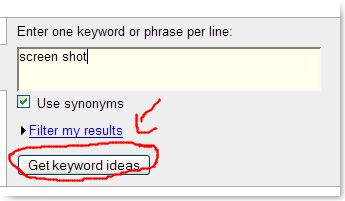
This is my first professionally taken screen shot, just created. Not too bad, eh? I was a bit wobbly with my red pen, but this looks like it is going to be good fun…

Hi Petra
I was in the same boat as you a few days ago. I found Jing it to is brilliant and FREE yipee! It is operated by techsmith who have the camtasia product.
It is probably the easiest product I have ever come across to use.
Also it does video as well, again very very easy!
I did a post on my blog yesterday that is using jing for screen shots, see what you think.
Good Luck
Lynne
This blog Is very informative , I am really pleased to post my comment on this blog . It helped me with ocean of knowledge so I really belive you will do much better in the future . Good job web master .
Thanks, Shortcuts! It is always nice to get good feedback, and also to get comments on posts!
LOL I love the red squiggly line, there are many free image editing software out there that will make that oval line as straight as can be, such as GIMP 🙂
.-= dave@used pontoon boats´s last blog ..2008 Crest 22? Superfisherman, Yamaha 150 HP Pontoon Boat =-.
Dave, that was my early days, I am actually using Jing now and am very happy with it. It does make straight lines!!! 😉
Whats happening, I found this website by mistake when I was going via Bing after that I arrived to your web site. I require to say your site is interesting I truly like your theme! Today I don’t have the free of charge time at the current moment to fully appear via your sitebut I’ve bookmarked it. I will be back in a day or 2 . Thanks for a great website.